Tampilkan postingan dengan label Android. Tampilkan semua postingan

Wah! BlackBerry Messenger Muncul di Android

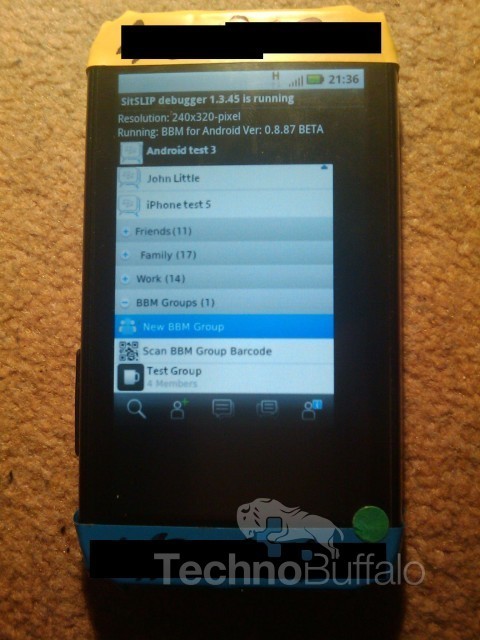
Screenshot BBM di Android (technobuffalo)
Setelah cukup lama tak pernah terdengar lagi tentang rencana Research In Motion (RIM) memasukkan BlackBerry Messenger ke OS Android, kali ini sebuah gambar mengejutkan muncul di dunia maya.

Adalah Techno Buffalo yang pertama kali membocorkan gambar ini, dimana di dalam gambar diperlihatkan bagaimana sebuah smartphone Android sedang melakukan uji coba terhadap aplikasi BlackBerry Messenger.

Di gambar tersebut juga terlihat dengan jelas tulisan BBM for Android ver: 0.8.87 beta. Apakah ini hanya tipuan seorang programmer, atau justru permainan gambar seorang photoshopper? Belum diketahui dengan pasti.

Yang pasti pihak Techno Buffalo mengklaim bahwa BBM untuk Android dan iPhone akan dirilis di akhir tahun sebagai bagian dari Mobile Fusion, layanan terbaru dari RIM.

Sumber: Detik
lanjutin baca "Wah! BlackBerry Messenger Muncul di Android"

Ucapkan Selamat Tinggal Pada Android Market

Sebenernya bukan karena google bangkrut jadi ga nerusin proyek marketnya buat android, tapi android market emang ganti nama jadi Google Play .

Buat cerita lebih lanjut baca aja postingan dari web orang yg gue copas, sory masih versi aslinya, tapi pasti udah pada ngerti lah, kalo misalnya ngga juga translate aja pake google translate :p

/* copas begin */

Hello, Google Play: Google launches sweeping revamp of app, book, music, and video stores
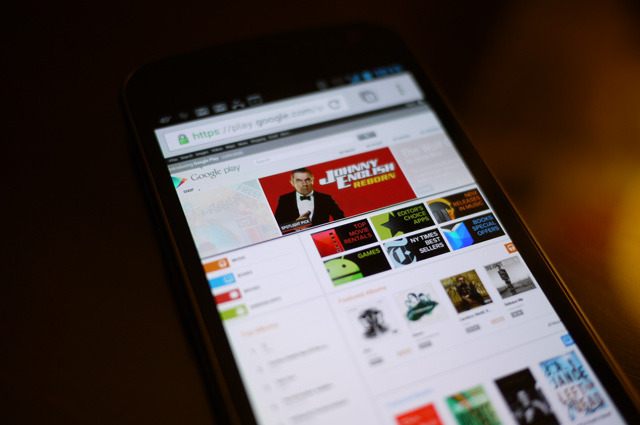
Google is taking a big new step in bringing all of its content arms under one roof — and that new entity is called Google Play. Starting today, Google will begin a rebranding of the Android Market, Google Music, Google Books, and its video offerings. Until now, all of those content hubs had more or less resided under the banner of the Android Market, and it seems like the company is interested in making users understand those disparate pockets of content as a unified whole. A company spokesman called Play "an evolution of Android Market."

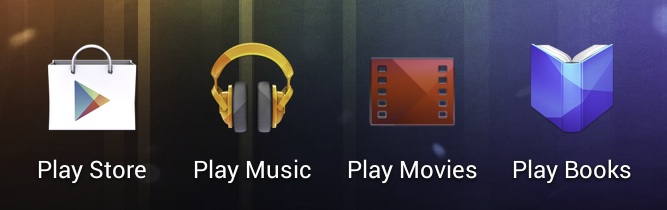
Google Play (called the Google Play Store in some instances) will become the single destination for all of the company's buyable content. Accordingly, the standard Android books, music, and video apps will become Google Play Books, Google Play Music, and Google Play Movies. But it's not just about devices. Google Play is meant to bring together the company's content offerings in both mobile and browser experiences.
Android devices running version 2.2 or later will have their Market app automatically updated "over the coming days," while the Google Play Store moniker will make its way into the Google sandbar, much like the Google+ service. The Android Market name will be retired, though you won't miss it much since the Google Play Store looks nearly identical.

The Mountain View-based company seems to be concentrating its messaging about the service on the fact that Google Play is cloud-based and will keep your content in sync. In fact, that message seems to be not just the focus here, but the main driver behind this change. It's clear that Google has struggled with a wide variety of content services (and methods of accessing those services), and wants to bring them all together in a way that makes sense to consumers.
In its announcement on the Google Blog, the company calls out the hassle of "moving files between your computers," and "endless syncing across your devices... [with] lots of wires." The statement seems designed to help users understand that Google Play is akin to Apple's iCloud and iTunes Match offerings. Google even touts free cloud storage for up to 20,000 songs. That's nothing new for current users of the Android Market, but admittedly the way Google has structured its e-commerce choices and services has never been especially clear. Hopefully this marks the beginning of real work to resolve those issues.

Google is also using this opportunity to show off its competitive pricing in movies, music, and books, with deals happening throughout the week in celebration of the launch. A full gamut of content will be available here in the US, while services will be limited in other countries due to licensing deals (or lack thereof). Irrespective of country, the Android Market will be replaced with Google Play as the official Android app destination.


Sumber: The Verge
lanjutin baca "Ucapkan Selamat Tinggal Pada Android Market"

Pengen Nyoba Android Ice Cream Sandwich Di Laptop? Coba Android x86

Android-x86 is a project that provides Android support for x86, making it easy to install it on netbooks or laptops. You can use it like any other Android 4.0 Ice Cream Sandwich device: install applications from the Android Market, add widgets and so on.


The Android x86 team has released Android x86 4.0 RC1, based on Android 4.0.3 (Ice Cream Sandwich) and features:
  • Support Multi-touch, Wifi, Audio, Bluetooth, G-sensor and Camera.
  • OpenGL hardware acceleration for AMD Radeon and Intel chipsets
  • Kernel 3.0.8 with KMS enabled - most netbooks can run Android-x86 in the native resolution.
  • V8 javascript engine
  • Simulate sdcard by internal storage
  • External usb drive and sdcard are auto mounted to /mnt/USB on plugging
  • Experimental support of Renderscript
  • A text based GUI installer which supports ext3/ext2/ntfs/fat32 filesystems
  • Hybrid ISO (you can dump the iso into a usb drive using "dd if=android-x86-4.0-xxx.iso of=/dev/sdX")
In my test Android x86 4.0 worked great on my  Asus EeePC: the camera, Wifi and so on are supported out of the box. The only issue I've had was related to suspend/sleep: I was unable to unlock the screen, but at least in my case, there was a fix (see under tips below). Also, applications compiled for ARM like Chrome, Firefox or Netflix and others don't work (they don't even show up in the Market) unless you recompile them.

If you don't have a netbook or laptop to test it and you want to give it a try in VirtualBox, unfortunately the ethernet won't work for now. You can, of course, test it in VirtualBox without an Internet connection - simply download the EeePC version, create a new VirtualBox machine and run it.

Update: for a custom ISO with a patch that adds ethernet support, see THIS post (thanks to PaweÅ‚ Lesiecki!) but please note that this build doesn't have the Android Market installed by default (and comes with some other  customizations). Since this not an official Android-x86 ISO, use it at your own risk!

A few Android-x86 4.0 (ICS) tips:
  • When using it in VirtualBox, but make sure you select "Disable Mouse Integration" (under the "Machine" menu) to get the mouse to work once you boot the Android x86 4.0 Live ISO
  • Disable screen autorotate from the Android-x86 settings, or else some application might rotate it for you (and that's quite annoying if your device doesn't support it)
  • If you can't unlock the screen, try to use the built-in wake-up keyboard shortcut if available (Fn + F1 for my Asus EeePC), then use the mouse to slide the keyguard
  • For shutdown / power off, you can use an application such as Shutdown.

Android x86-4.0 RC1 screenshots

Here are a few screenshots from my Asus EeePC running Android-x86 4.0 RC1:

android x86 4.0 screenshot

Download Android x86 4.0

Android-x86 4.0 has been tested / it should work on AMD Brazos (MSI 110W), Asus EeePC or some Asus laptops/tablets and Tegav2 / Viewpad 10. These are the officially supported devices, but Android-x86 should work on others too. An old list of supported devices / hardware can be found HERE.


To use it, write the ISO on an USB stick using Unetbootin, Linux Live USB Creator (LiLi) or using the command line (example: "dd if=android-x86-4.0-RC1-eeepc.iso of=/dev/sdX", where "sdaX" is your USB drive). For more info, see the Android-x86 installation page.

/* end of copas */

Sory bahasanya inggris, mau liat translatenya, klik ini aja :p
Oh iya, kalo mau di coba di laptop, si file iso bisa di burn ke cd, atau pake usb pake aplikasi Unetbootin (Linux, Mac, Windows) atau Pendrive (Windows) buat cara make aplikasi itu baca aja di homepage tiap aplikasi.

Sumber: Webupd8.org
lanjutin baca "Pengen Nyoba Android Ice Cream Sandwich Di Laptop? Coba Android x86"
 
Text Back Link Exchange
+ Follow This Blog