Tampilkan postingan dengan label News. Tampilkan semua postingan

Ilmuwan Fisika Ukraina Membuktikan Bahwa Putaran Poros Bumi Bisa Berbalik Arah

Ilmuwan Fisika Ukraina Masuk Islam Karena Membuktikan Kebenaran Al-qur’an
Demitri Bolykov, sorang ahli fisika yang sangat menggandrungi kajian serta riset-riset ilmiah, mengatakan bahwa pintu masuk ke Islamannya adalah fisika. Sungguh suatu yang sangat ilmiah, bagaimanakah fisika bisa mendorang Demitri Bolyakov masuk Islam?


Demitri mengatakan bahwa ia tergabung dalam sebuah penelitian ilmiah yang dipimpin oleh Prof. Nicolai Kosinikov, salah seorang pakar dalam bidang fisika.

Mereka sedang dalam penelitian terhadap sebuah sempel yang diuji di laboratorium untuk mempelajari sebuah teori moderen yang menjelaskan tentang perputaran bumi dan porosnya. Mereka berhasil menetapkan teori tersebut.

Akan tetapi Dimetri mengetahui bahwasanya diriwayatkan dalam sebuah hadis dari nabi saw yang diketahui umat Islam, bahkan termasuk inti akidah mereka yang menguatkan keharusan teori tersebut ada, sesuai dengan hasil yang dicapainya. Demitri merasa yakin bahwa pengetahuan seperti ini, yang umurnya lebih dari 1.400 tahun yang lalu sebagai sumber satu-satunya yang mungkin hanyalah pencipta alam semesta ini.

Teori yang dikemukan oleh Prof. Kosinov merupakan teori yang paling baru dan paling berani dalam menfsirakan fenomena perputaran bumi pada porosnya. Kelompok peneliti ini merancang sebuah sempel berupa bola yang diisi penuh dengan papan tipis dari logam yang dilelehkan , ditempatkan pada badan bermagnit yang terbentuk dari elektroda yang saling berlawanan arus.

Ketika arus listrik berjalan pada dua elektroda tersebut maka menimbulkan gaya magnet dan bola yang dipenuhi papan tipis dari logam tersebut mulai berputar pada porosnya fenomena ini dinamakan “Gerak Integral Elektro Magno-Dinamika”. Gerak ini pada substansinya menjadi aktivitas perputaran bumi pada porosnya.

Pada tingkat realita di alam ini, daya matahari merupakan “kekuatan penggerak” yang bisa melahirkan area magnet yang bisa mendorong bumi untuk berputar pada porosnya. Kemudian gerak perputaran bumi ini dalam hal cepat atau lambatnya seiring dengan daya insensitas daya matahari. Atas dasar ini pula posisi dan arah kutub utara bergantung.

Telah diadakan penelitian bahwa kutub magnet bumi hingga tahun 1970 bergerak dengan kecepatan tidak lebih dari 10 km dalam setahun, akan tetapi pada tahun-tahun terakhir ini kecepatan tersebut bertambah hingga 40 km dalam setahun.

Bahkan pada tahun 2001 kutub magnet bumi bergeser dari tempatnya hingga mencapai jarak 200 km dalam sekali gerak. Ini berarti bumi dengan pengaruh daya magnet tersebut mengakibatkan dua kutub magnet bergantian tempat. Artinya bahwa “gerak” perputaran bumi akan mengarah pada arah yang berlawanan. Ketika itu matahari akan terbit (keluar) dari Barat !!!

Ilmu pengetahuan dan informasi seperti ini tidak didapati Demitri dalam buku-buku atau didengar dari manapun, akan tetapi ia memperoleh kesimpulan tersebut dari hasil riset dan percobaan serta penelitian.

Ketika ia menelaah kitab-kitab samawi lintas agama, ia tidak mendapatkan satupun petunjuk kepada informasi tersebut selain dari Islam.

Ia mendapati informasi tersebut dari sebuah hadis yang diriwayatkan oleh Abu Huarirah, bahwasanya Rasulullah saw bersabda, ”Siapa yang bertaubat sebelum matahari terbit dari Barat, maka Allah akan menerima Taubatnya.” (dari kitab Islam wa Qishshah)

Sumber: Islam is Logic
lanjutin baca "Ilmuwan Fisika Ukraina Membuktikan Bahwa Putaran Poros Bumi Bisa Berbalik Arah"

Fedora Linux 18 Will Boot on UEFI Hardware with Microsoft's Help

Red Hat Microsoft UEFI From the 'Strange Bedfellows' files:

We've known for some time that Microsoft has been pushing hardware vendors for Secure UEFI as part of Windows 8. The tl;dr version of UEFI is that it's secure encryption on the physical hardware at the pre-boot layer. Basically in order to boot the hardware will have to have a secure key.

The problem with that is that it won't easily allow people to load Linux.

So what's a Linux vendor to do?

Red Hat's Fedora Linux has a solution and it's not one that is entirely satisfactory. Fedora will $BUY$ a key via Microsoft that will enable it to run. This is the solution now being offered up by Fedora developer Matthew Garret (and his blog post has fantastic details about the whole concept and the deliberation)

The key costs $99 and the funds go to VeriSign (though hardware signing is done via Microsoft).

The problem of course is that Fedora will perhaps be tied to Microsoft's Secure UEFI efforts in order to enable Linux on new hardware. The bigger problem would be if Secure UEFI wasn't dealt with and Linux wouldn't run on new hardware at all.

I respect Garrett's position, though I have another solution.

Don't buy, UEFI Windows 8 hardware. Seriously. Why pay the Microsoft tax? Build your own machine, motherboards from computer stores (newegg etc) will have lots of options and you won't need to bother with the Window 8 pre-load either.

The larger question of course is when it comes to server hardware - will Fedora's corporate sponsor Red Hat capitulate as well? Server hardware (arguably equally as important to secure) doesn't seem to be stuck on the same Secure UEFI approach that Microsoft is ramming down hardware vendor throats for Windows 8. When it comes to Servers, Red Hat can and does influence hardware vendors.

Garrett notes that Red Hat could potentially have influenced hardware vendors for UEFI here too, but that would have still left other distros exposed. I don't know, personally I would have like to have seen the hardware vendors come to terms with the reality that there is more than one desktop operating system.

Sean Michael Kerner is a senior editor at InternetNews.com, the news service of the IT Business Edge Network, the network for technology professionals Follow him on Twitter @TechJournalist.

Sumber: Internetnews
lanjutin baca "Fedora Linux 18 Will Boot on UEFI Hardware with Microsoft's Help"

Manfaat Mendengarkan Musik Metal

Tidak bisa dipungkiri bahwa musik cadas seperti Metal kian hari kian digandrungi anak muda masa kini. Ini terbukti dengan makin populernya genre musik ini di kalangan masyarakat dan sudah seperti menjadi trend gaya hidup anak muda.

Meski tak semua orang suka dengan musik beraliran cadas. Iramanya yang hingar bingar dianggap sebagai musik yang hanya membuat telinga tuli. Tapi mulai sekarang, meskipun Anda tak menyukainya, tak ada salahnya jika Anda memanfaatkan keberadaannya untuk meredam stres. Tak percaya? Penelitian terbaru yang dilansir oleh Sciencedaily bahkan menyebutkan bahwa penggemar musik heavy metal ternyata lebih pandai meredam emosi negatif, lebih ekspresif dan lebih bisa meluapkan kemarahannya.Penelitian yang melibatkan 1.057 murid dari usia antara 11 dan 18 tahun dari sekolahNational Academy di Amerika.

Semua responden diteliti dengan cermat hubungan mereka dengan keluarga, perilaku di sekolah, bagaimana mereka menghabiskan waktu santai, musik kesukaan, dan jenis media yang mereka konsumsi. “Penelitian ini berhasil membuktikan bahwa bahwa presepsi yang selama ini beredar salah. Selama ini orang menganggap murid yang cerdas dan memiliki intelijensi tinggi cenderung didominasi mereka yang suka musik klasik dan menghabiskan banyak waktu untuk membaca,” ujar Stuart Cadwallader, kepala penelitian dari Warwick University.Sayangnya, menurut Stuart tudi mereka yang menikmati musik heavy metal cenderung mengalami kesulitan untuk menjalin hubungan dengan keluarga dan teman-teman mereka. Dan mereka menjadikan musik sebagai media ‘keterbukaan’.

Sebagian besar murid mengatakan mereka tidak mempertimbangkan untuk menjadi penganut Metal sejati tapi musik heavy metal memahami aspek spesifik kebudayaan pemuda saat ini. Dengan menggunakan musik yang keras dan agresif, mereka bisa keluar dan lepas dari rasa frustrasi dan kemarahan. Di sini berhasil dibuktikan bahwa musik heavy metal atau cadas juga bisa meredekan situasi hati atau mood yang sedang buruk. Menurut Stuart, “banyak musisi aliran heavy metal juga memiliki tingkat intelijensi tinggi seperti vokalis Iron Maiden, Bruce Dickinson, yang selain sebagai musisi, juga berprofesi sebagai novelis dan pilot penerbangan.”

Beberapa manfaat mendengarkan musik metal :

1. Mendengarkan musik metal bisa memperbaiki mood.
Mendengar musik logam berat ini bisa menstabilkan mood. Terlebih untuk remaja yang mengidap depresi. Dengan mendengarkannya, perasaan sedih atau marah bisa diluapkan. Si remaja bisa lebih santai atau tenang untuk menjalani hidupnya. Tapi, pengawasan orang tua disini perlu. apabila mood si anak turun, sebaiknya larang anak mendengar musik ini.

2. IQ meningkat.
Dari hasil penelitian, pendengar musik beraliran metal ini, umumnya mahasiswa mendapatkan nilai lebih tinggi dari mahasiswa lainnya, bahkan diatas rata-rata. Beberapa bidang studi juga menemukan kecerdasan yang tinggi diantara penikmat musik keras ini.

3. Menurunkan potensi bunuh diri.
Musik metal dapat menurunkan emosi atau tingkat kecemasan. Setelah mendengarkan musik metal. Pendengar bisa lebih nyaman atau lebih baik dari sebelumnya. Musik ini dapat mengobati rasa tertekan mereka.

Sumber: Bankeray
lanjutin baca "Manfaat Mendengarkan Musik Metal"

Chrome OS: Good Gimmicks, But What Else?

I don’t own a Chomebook; and it’s been a couple of years since I’ve tried the Chrome OS — a pre-alpha release or something. Anyway, the new version came out yesterday. Most of the Web was all ga-ga over the new window manager Aura, which intrigued me enough to give it another try.

So, I grabbed the latest build from Hexxeh — to be precise, it’s the open source Chromium OS, “Vanilla” edition (Version 20.0.1096.1; and not the 19.0.1048.17, the rest of the Web is talking about). Hexxeh also offers a Lime version (that supposedly supports additional Wi-Fi drivers and such), but that one failed to boot on my Samsung RV509 laptop. Good thing is the Vanilla build didn’t have any issues with my Broadcom wireless Ethernet.

I played with it for a few hours this afternoon, and here are my notes…

The bootup
After copying the image into a USB key using the dd command, the bootup time left me quite pleased — around 20 seconds for first boot, 12-13 seconds for subsequent bootups, and 5-6 seconds for shutdown. And this is on a not so state-of-the-art hardware.

Instead of a display manager (like KDM or GDM), it starts of with a four-step wizard:
  1. Select language, keyboard and network — so if you don’t have Internet access, you better try later… 
  2. Check for updates — I pressed escape to skip it 
  3. Sign in to Google account 
  4. And finally, select account picture (can use the webcam to take a picture)
Making a face and setting account avatar
The welcome screen up on first login
Get trained on touchpad tricks
The new UI
Right after login it opens the Chromium browser with a welcome message which shortly redirects to a touchpad tutorial page — tap for left click, two-finger right click, two-finger scroll, and drag and drop. Besides left click using touchpad tap, none of the other tests were successful on the RV509. Maybe it only works with official Chromebook touchpad hardware; nonetheless all the other three worked across the OS. However, it made no difference since moving the cursor from one place to other turned out to be really slow (no improvements after the setting the “touchpad speed” to the maximum from system settings). No worries, I attached a USB mouse and things were normal. The desktop UI pretty much looks like what we are traditionally used to — a panel at the bottom and the rest is place for windows. The Chromium window only has a maximise and close button (no minimise). Maximising a window hides the panel under it. The window manager even supports features like snap to edge.

The panel, on the other hand, has a Chromium icon on the extreme left to launch a new window, or open a new tab if the browser is already running. To launch a new window you can press Ctrl+N as you would on a regular desktop OS. Next to it sits the Applications icon.
Snap to edge feature of the window manager
Yes, unlike the recent trend towards fullscreen-only widows, Chrome OS lets you resize and overlap windows
What all's on the system tray menu?
The extreme right side of the panel has what we typically call the system tray — with the clock, keyboard type, Wi-Fi signal, and battery indicator icons. Clicking on the system tray gives you options to system settings, screen brightness and volume controls, Bluetooth settings, date & time (clicking which takes you to the date and time configuration setting — which otherwise is hidden under system settings as “advanced settings”), the battery power indicator, besides links to shut down, sign out and lock screen.

Interesting deal with the sign out link is it takes you back to the display manager, and this time shows an option to login as guest. Guest login launches Chromium in incognito mode.

Back to the date and time, I think it’s very silly for the system to default to UTC – 0700. Either it should ask the user during system setup for a time zone, or intelligently guess from location access based on IP address or something similar.

By the way, right-clicking the desktop pops just a single option — “Set wallpaper”. But it turns out we’ve to be happy with the preset defaults, with no way to set one of our own. Would have been nice if, at least, it was able to fetch pictures from the user’s Picasa account.
System Settings is also integrated into Chromium
Advanced options inside System Settings
Change wallpaper -- but no option to select one of your own
Apps and a Web Store
Now on the Applications button, to begin with, you’ll only find the Chromium browser, a file manager and the Chrome Web Store icons. The latter two will, obviously, launch inside Chromium. Time to fill up the system with some apps.

Of course, for Google, apps aren’t what we’re used to on a regular desktop — we can’t have GIMP, Libre Office, Firefox and the like. Apps here are whatever holds inside of the Chrome Web Store — browser-based applications, which more often than not, are links to Web-based services’ websites. But we are familiar with that already. I’ll not get into the sort of apps available here, because those are accessible to anyone with a Chrome/Chromium browser at their disposal at all times.

Anyway, I randomly installed a few apps just to fill up the apps launcher screen.
Chrome Web Store has Web 'shortcuts' galore
Web Store lets you launch an app from within if it's already installed
The application launcher screen
File management
Coming to the file manager, it has a minimalistic and clean UI as you can see in the following screenshots. By default, it mounted all my hard disk partitions, and somehow always chose to open the first available hard disk partition after launch — see the vmlinuz file, and var, tmp, etc, directories? While the OS saves everything in a folder called Downloads (like the browser does by default on a regular desktop OS too), I wonder why it doesn’t default to this directory — after all, the Downloads directory here is complimentary to the user home directory on other distros.

Things like Ctrl+A, Ctrl+C, etc., work as expected inside the file manager. However, the odd thing is, when you paste something, it doesn’t immediately show up sometimes — you gotta hit the refresh button. That reminds me, keyboard shortcuts like F5 to refresh a page, or Alt+F4 to close a window, don’t work. I wonder why!

On the up side, the online Google Docs directory is also mounted by default and we can copy paste between the local and the online storage like we do between two regular directories. Then again, copying a google document like word processor file locally and double clicking that has no effect. The only things that seem to work with double clicks are pictures, archives and FOSS multimedia files formats.

I gotta admit the browser-based picture viewer looks dandy. Usual keyboard shortcuts like right arrow key to view next, and left arrow key to view previews photos work as expected. Besides, it also comes with basic image editing features like crop, rotate, brightness controls, etc.
The minimalistic file manager is quite adequate
While the default file manager layout is list view, you can also select the grid layout
Even right click options are minimal
Image viewer comes with basic image editing facilities
Accessing multimedia content online
There’s a major goofup with Adobe Flash installation in this build. As you can see on the following screenshots, both Grooveshark and Google Music indicate that Flash is missing. Both services provide a helping hand with a direct link to Adobe’s website for installing Flash. Meanwhile, Adobe reports latest version of Flash is already installed.
Grooveshark service insists I install Flash
So does Google Music
Adobe refutes the missing Flash plugin claims
Next thing to check was YouTube, and although it opened the HTML5 videos instead of Flash, videos were basically still frames. What I mean by this is, you can see the progress bar racing towards the right while downloading video, but the video itself decides to sit pretty on the very first frame. No amount of pause and play will make it roll… in fact, dragging the slider will take you to the video frame for that very position, and again sit pretty there.
YouTube's HTML5 video player doesn't work
Now, considering its inability play common/popular multimedia file formats stored locally on your disk (due to lack of installed decoders), and add to that its inability to access media content online — it’s sort of like a sign for the multimedia junkies to stay off of this OS. Although, I’ll give Chrome OS the benefit of the doubt, and blame it on the specific dev release version that I’m using here.

Regular browsing and finishing touches
Nothing to report here. You browse the Web as you would using a regular Chrome/Chromium browser installed on your system. And, yes, you do occasionally encounter a crash. You can check for misbehaving apps/websites from the Task Manager application (browser settings –> view background pages).
Yes, Apps still crash -- Web-based or not hardly makes a difference
The Task Manager is hardly adequate -- where are the system processes?
And how exactly would this help the 'nerds'?
I’m assuming the Stats for Nerds link on the Task Manager application (see above screenshot) is to please us nerds with some “detailed” system data. But wouldn’t it been nicer if a terminal application was also available so that us nerds could use regular command-line utilities?

I guess that’s more or less it. Although, the new UI is a major face-lift for the Chrome OS, this distro seems only good for casual reading, browsing and electronic communications, and nothing serious. I do understand that this is what netbooks are for, but under it’s current incarnation, I don’t really see any real need for Chrome OS — a regular distro with KDE, GNOME or something else is a much better option in my books.

I sure can understand it’s inability to play/access/open patent-encumbered and/or proprietary file formats like mpeg, avi, mp3, rar, etc., but what about PDF, ODT and CSV files? Silliest of the issues were things like — the system’s inability to open PDF files stored on your Google Docs directory when accessed from within the file manager, although you can open them just fine when you access them from the docs.google.com website.

It should also be able to intelligently guess the file/mime types. For example, it opens any file with a .txt extension just fine, meanwhile would throw an error if a file has a .conf or .csv extension. Besides, just like any other distro, there should be a way to install support for the patent-encumbered formats — as long as the user comes from a country where software patents are illegal. MP3, AVI, MPEG, etc., all have FOSS decoders available after all.
The integrated Video player along with the a minimalistic Audio player
So, what should I ideally do with all the locally stored documents?
After all, it's not just about Chromium. There's more to computing than a browser.
By the way, check the above screenshot where it plays an Ogg Vorbis album. The songs in that album are property tagged with song titles, album artist names, etc. Yet, it wasn’t able to read anything but the file name. Thankfully, it could play the song.

The only thing significant in Chromium OS that I notice is the battery indicator showing around 5 hours of battery life (when fully-charged) compared to 3 hours for regular distros on a 6-cell laptop. But just for battery life, would you be willing to give all the other flexibilities? As for accessing multimedia content online, reading, browsing and communicating on an Android phone or a tablet bundles a much more mature experience — after all those apps from Google Play (Android Market) will not only help you store/access data on the cloud, but also let you, yes, store and access, data on your local SDCard.

On a side note: Thankfully, Hexxeh has created a persistent image, so data/settings across reboots stays in the USB. Additionally, this goes to Google… even after overwriting the USB with a fresh image, and up on a fresh sign-up to Chromium OS, the apps that I had downloaded earlier somehow came back automagically. If only it was able to keep the timezone in memory? Sigh!

Sumber: Linux For U (nyari terjemahan? klik ini)
lanjutin baca "Chrome OS: Good Gimmicks, But What Else?"

Wah! BlackBerry Messenger Muncul di Android

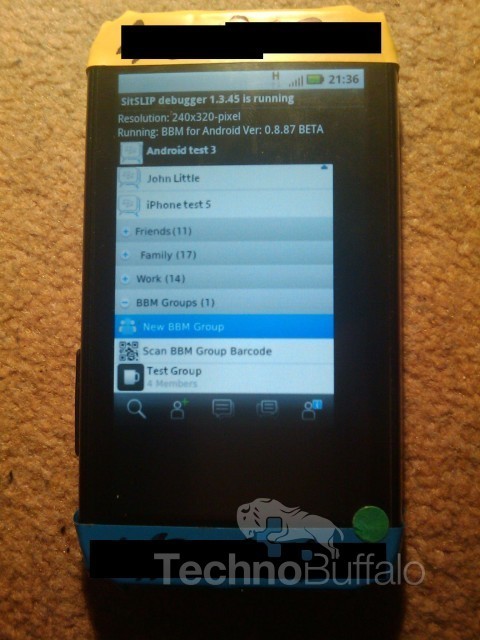
Screenshot BBM di Android (technobuffalo)
Setelah cukup lama tak pernah terdengar lagi tentang rencana Research In Motion (RIM) memasukkan BlackBerry Messenger ke OS Android, kali ini sebuah gambar mengejutkan muncul di dunia maya.

Adalah Techno Buffalo yang pertama kali membocorkan gambar ini, dimana di dalam gambar diperlihatkan bagaimana sebuah smartphone Android sedang melakukan uji coba terhadap aplikasi BlackBerry Messenger.

Di gambar tersebut juga terlihat dengan jelas tulisan BBM for Android ver: 0.8.87 beta. Apakah ini hanya tipuan seorang programmer, atau justru permainan gambar seorang photoshopper? Belum diketahui dengan pasti.

Yang pasti pihak Techno Buffalo mengklaim bahwa BBM untuk Android dan iPhone akan dirilis di akhir tahun sebagai bagian dari Mobile Fusion, layanan terbaru dari RIM.

Sumber: Detik
lanjutin baca "Wah! BlackBerry Messenger Muncul di Android"

20 Fakta Menarik Seputar Rokok

Ini gue dapet dari temen gue di FB, dia share di grup, pas baca ngakak juga nih, makanya gada salahnya gue share juga di blog gue, hahahaha

Untung pas baca gue udah berhenti, jadi aman.

ps: ini semua hanya joke belaka, tp ada faktanya juga, cermat-cermatlah memilih :)

1. Mendukung program pemerintah dalam menekan (mengurangi) jumlah penduduk. Berikut data-data yg dilansir WHO:
  • Setiap Menit, 60 Orang Mati Karena Rokok.
  • 100 juta kematian tercatat akibat tembakau pada abad ke 20 lalu. Jika tren ini terus berlanjut, akan ada kenaikan hingga satu miliar kematian pada abad ini.
  • Di Indonesia terjadi 1.174 kematian perhari akibat asap rokok.
2. Bisa menjadi batu loncatan untuk karir yangg lebih tinggi. (dari perokok berpotensi jd alkoholic, narkoba, dsb). Peneliti kesehatan dari Universitas Indonesia, Rita Damayanti berujar rokok adalah pintu gerbang menuju perilaku yang lebih berisiko. “Rokok adalah batu loncatan (stepping stone) untuk mengambil risiko yang lebih besar,” tuturnya. Menurut data penelitian Rita, orang yang pernah merokok akan berisiko 13 kali menenggak alkohol, 7,03 kali berhubungan seks pranikah, dan 1,3 kali kecanduan narkoba.

3. Mempercepat proses kerja birokrasi pemerintah. Sudah sangat lazim kalo birokrasi di Indonesia terkenal ruwet dan lama.. idiom yg dianut aparat birokrasi adalah: Kalau bisa diperlambat, kenapa harus dipercepat…

Tapi semua itu akan berubah drastis ketika ada yg namanya: “uang rokok”. Segala urusan birokrasi seperti bikin KTP, SIM atau ngurus surat/administrasi di Kantor2 dinas, atau malah ketika ditilang, prosesnya akan cepat dan mudah bila ada “uang rokok”.

4. Mengurangi (jumlah) orang miskin. Lebih dar 50% perokok berasal dari kalangan menengah ke bawah. Dan rata-rata orang miskin membelanjakan lebih dari 25% penghasilannya utk konsumsi rokok. Jika makin banyak orang miskin yang merokok, maka jumlah orang miskin makin berkurang.

5. Bisa membentuk PARTAI PEROKOK INDONESIA dan memenangkan PEMILU. “Sekitar 31,4 persen atau 72,8 juta jiwa penduduk Indonesia adalah perokok,” ungkap Tjandra Yoga Aditama, dokter ahli paru-paru dari Rumah Sakit Persahabatan. Bila perokok indonesia bikin partai akan bisa memenangkan pemilu, karena sekitar 31% penduduk indonesia adalah perokok. Minimal dapat kursi di DPR

6. Berbuat amal kebaikan. Kalau ada orang yang mau pinjam korek api selagi main game paling tidak sudah siap / tidak mengecewakan orang yang ingin meminjam.

7. Baik untuk basa-basi / keakraban. Kalau ketemu orang misalnya di Tempat kita main game kita bisa tawarkan rokok. Kalau basa-basinya nawarin uang kan boros.

8. Perokok pasif lebih berbahaya daripada perokok aktif, maka untuk mengurangi resiko tersebut aktiflah merokok.

9. Menghindarkan dari perbuatan jahat karena tidak pernah ditemui orang yang membunuh, mencuri dan berkelahi sambil merokok.

10. Memberikan lapangan kerja bagi buruh rokok, dokter, pedagang asongan, pembuat asbak, pabrik kemasan dan perusahaan obat batuk.

11. Bisa menambah suasana pedesaan/nature bagi ruangan ber AC dengan asapnya, sehingga seolah-olah berkabut.

12.Membantu program KB dan mengurangi penyelewengan karena konon katanya merokok bisa menyebabkan IMPOTEN

13. Melatih kesabaran dan menambah semangat pantang menyerah karena bagi pemula merokok itu tidak mudah. Batuk-batuk dan tersedak tapi tetap diteruskan (bagi yang lulus).

14. Menambah kenikmatan: sore hari minum kopi dan makan pisang goreng sungguh nikmat. Apalagi ditambah merokok !

15. Anti maling, suara perokok batuk berat di malam hari mujarab untuk mengusir penjahat.

17. Membantu shooting film keji, rokok digunakan penjahat buat nyundut jagoan yang terikat di kursi.

18. Film jagoan pasti lebih cool bila sambil ngerokok.

19. Membuat awet muda, karena konon orang yang merokok berat belum sampai tua udah mati duluan kena kanker paru-paru. Fakta lain …sekitar 30% orang meninggal di dunia adalah perokok. 70%-nya bukan perokok..!!

20. Bahan inspirasi dan pendukung membuat Tugas Akhir, sehingga seharusnya dicantumkan ucapan terima kasih untuk rokok pada kata sambutan.

Sumber: Badri (aslinya gatau dari mana)
lanjutin baca "20 Fakta Menarik Seputar Rokok"

Gnome 3.4 Udah Release

 Abis seminggu berkutat dengan perkuliahan dan tugas, pas malem minggu ini akhirnya bisa 'agak' nyantei dan browsing internet yg gada hubungannya sama tugas.

Pas lagi browsing ke webupd8.org buat update berita terbaru linux, ternyata Gnome 3.4 udah release *applause* dan apa aja yang baru? cekidot tweet dibawah ini:


lanjutin baca "Gnome 3.4 Udah Release"

Ucapkan Selamat Tinggal Pada Android Market

Sebenernya bukan karena google bangkrut jadi ga nerusin proyek marketnya buat android, tapi android market emang ganti nama jadi Google Play .

Buat cerita lebih lanjut baca aja postingan dari web orang yg gue copas, sory masih versi aslinya, tapi pasti udah pada ngerti lah, kalo misalnya ngga juga translate aja pake google translate :p

/* copas begin */

Hello, Google Play: Google launches sweeping revamp of app, book, music, and video stores
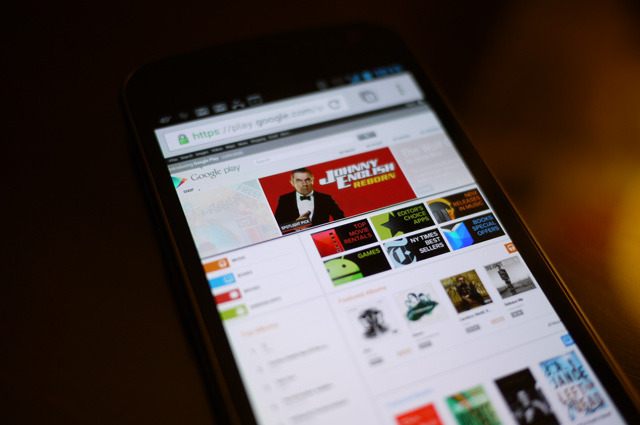
Google is taking a big new step in bringing all of its content arms under one roof — and that new entity is called Google Play. Starting today, Google will begin a rebranding of the Android Market, Google Music, Google Books, and its video offerings. Until now, all of those content hubs had more or less resided under the banner of the Android Market, and it seems like the company is interested in making users understand those disparate pockets of content as a unified whole. A company spokesman called Play "an evolution of Android Market."

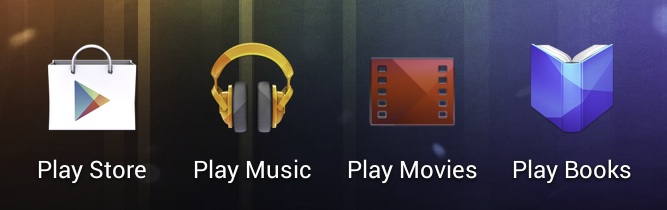
Google Play (called the Google Play Store in some instances) will become the single destination for all of the company's buyable content. Accordingly, the standard Android books, music, and video apps will become Google Play Books, Google Play Music, and Google Play Movies. But it's not just about devices. Google Play is meant to bring together the company's content offerings in both mobile and browser experiences.
Android devices running version 2.2 or later will have their Market app automatically updated "over the coming days," while the Google Play Store moniker will make its way into the Google sandbar, much like the Google+ service. The Android Market name will be retired, though you won't miss it much since the Google Play Store looks nearly identical.

The Mountain View-based company seems to be concentrating its messaging about the service on the fact that Google Play is cloud-based and will keep your content in sync. In fact, that message seems to be not just the focus here, but the main driver behind this change. It's clear that Google has struggled with a wide variety of content services (and methods of accessing those services), and wants to bring them all together in a way that makes sense to consumers.
In its announcement on the Google Blog, the company calls out the hassle of "moving files between your computers," and "endless syncing across your devices... [with] lots of wires." The statement seems designed to help users understand that Google Play is akin to Apple's iCloud and iTunes Match offerings. Google even touts free cloud storage for up to 20,000 songs. That's nothing new for current users of the Android Market, but admittedly the way Google has structured its e-commerce choices and services has never been especially clear. Hopefully this marks the beginning of real work to resolve those issues.

Google is also using this opportunity to show off its competitive pricing in movies, music, and books, with deals happening throughout the week in celebration of the launch. A full gamut of content will be available here in the US, while services will be limited in other countries due to licensing deals (or lack thereof). Irrespective of country, the Android Market will be replaced with Google Play as the official Android app destination.


Sumber: The Verge
lanjutin baca "Ucapkan Selamat Tinggal Pada Android Market"

Pengen Nyoba Android Ice Cream Sandwich Di Laptop? Coba Android x86

Android-x86 is a project that provides Android support for x86, making it easy to install it on netbooks or laptops. You can use it like any other Android 4.0 Ice Cream Sandwich device: install applications from the Android Market, add widgets and so on.


The Android x86 team has released Android x86 4.0 RC1, based on Android 4.0.3 (Ice Cream Sandwich) and features:
  • Support Multi-touch, Wifi, Audio, Bluetooth, G-sensor and Camera.
  • OpenGL hardware acceleration for AMD Radeon and Intel chipsets
  • Kernel 3.0.8 with KMS enabled - most netbooks can run Android-x86 in the native resolution.
  • V8 javascript engine
  • Simulate sdcard by internal storage
  • External usb drive and sdcard are auto mounted to /mnt/USB on plugging
  • Experimental support of Renderscript
  • A text based GUI installer which supports ext3/ext2/ntfs/fat32 filesystems
  • Hybrid ISO (you can dump the iso into a usb drive using "dd if=android-x86-4.0-xxx.iso of=/dev/sdX")
In my test Android x86 4.0 worked great on my  Asus EeePC: the camera, Wifi and so on are supported out of the box. The only issue I've had was related to suspend/sleep: I was unable to unlock the screen, but at least in my case, there was a fix (see under tips below). Also, applications compiled for ARM like Chrome, Firefox or Netflix and others don't work (they don't even show up in the Market) unless you recompile them.

If you don't have a netbook or laptop to test it and you want to give it a try in VirtualBox, unfortunately the ethernet won't work for now. You can, of course, test it in VirtualBox without an Internet connection - simply download the EeePC version, create a new VirtualBox machine and run it.

Update: for a custom ISO with a patch that adds ethernet support, see THIS post (thanks to PaweÅ‚ Lesiecki!) but please note that this build doesn't have the Android Market installed by default (and comes with some other  customizations). Since this not an official Android-x86 ISO, use it at your own risk!

A few Android-x86 4.0 (ICS) tips:
  • When using it in VirtualBox, but make sure you select "Disable Mouse Integration" (under the "Machine" menu) to get the mouse to work once you boot the Android x86 4.0 Live ISO
  • Disable screen autorotate from the Android-x86 settings, or else some application might rotate it for you (and that's quite annoying if your device doesn't support it)
  • If you can't unlock the screen, try to use the built-in wake-up keyboard shortcut if available (Fn + F1 for my Asus EeePC), then use the mouse to slide the keyguard
  • For shutdown / power off, you can use an application such as Shutdown.

Android x86-4.0 RC1 screenshots

Here are a few screenshots from my Asus EeePC running Android-x86 4.0 RC1:

android x86 4.0 screenshot

Download Android x86 4.0

Android-x86 4.0 has been tested / it should work on AMD Brazos (MSI 110W), Asus EeePC or some Asus laptops/tablets and Tegav2 / Viewpad 10. These are the officially supported devices, but Android-x86 should work on others too. An old list of supported devices / hardware can be found HERE.


To use it, write the ISO on an USB stick using Unetbootin, Linux Live USB Creator (LiLi) or using the command line (example: "dd if=android-x86-4.0-RC1-eeepc.iso of=/dev/sdX", where "sdaX" is your USB drive). For more info, see the Android-x86 installation page.

/* end of copas */

Sory bahasanya inggris, mau liat translatenya, klik ini aja :p
Oh iya, kalo mau di coba di laptop, si file iso bisa di burn ke cd, atau pake usb pake aplikasi Unetbootin (Linux, Mac, Windows) atau Pendrive (Windows) buat cara make aplikasi itu baca aja di homepage tiap aplikasi.

Sumber: Webupd8.org
lanjutin baca "Pengen Nyoba Android Ice Cream Sandwich Di Laptop? Coba Android x86"
 
Text Back Link Exchange
+ Follow This Blog